






WIDE GAMUT - INDIVIDUALLY MEASURED
ORDERS AT THE END OF THE PAGE
 CMP Digital Target – Digital Camera Calibration and Profiling
CMP Digital Targets are color targets designed for the calibration and profiling of digital cameras. They allow you to accurately characterize your camera’s color rendering and create custom profiles to achieve more faithful and consistent results throughout your RAW workflow.
The profiles created can improve color accuracy, skin tone rendering, the reproduction of saturated colors, as well as the transition between highlights and shadows. CMP Digital Targets are compatible with the major RAW development and color management software.
The CMP Digital Target range of calibration targets has been available for around fifteen years and has continuously evolved over the years. CMP targets are used throughout the photographic industry, but also in a wide range of industrial applications. Companies and organizations such as Hasselblad, France Télévisions, Dassault, the Thales / Angénieuxgroups, Safran, the CNRS, and many others use these targets for their specific applications.
RAW development software uses its own internal processing workflows and rendering methods, based on the technical and aesthetic choices made by its developers. These choices can sometimes be open to discussion, particularly when it comes to highlight rendering. Using custom camera profiles makes it possible to move beyond these limitations and achieve a more controlled and consistent rendering.
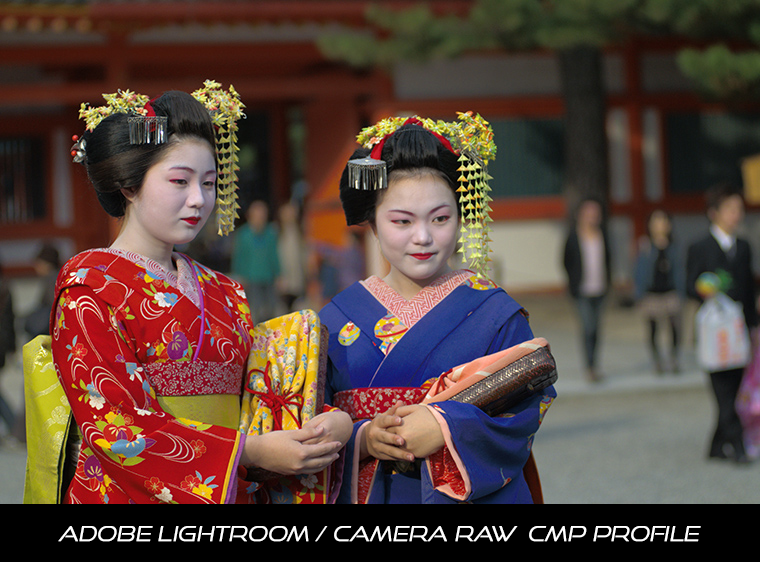
In the example below, simply moving the mouse over the image allows you to see the differences between the native rendering of Lightroom and the same image processed using a CMP profile. Without any other adjustment, the image appears softer, with more refined colors, more nuanced skin tones, better highlight rendering, and more subtle reproduction of variations within highly saturated colors. The result is images that are much easier to work with, thanks to a cleaner and more accurate starting point.
photograph Henri Culubret - Japon, Kyoto
Move your mouse over the image to see the different rendering options
With proper calibration and carefully chosen parameters when creating the profiles, you can achieve much greater control over color, with accurate colors and a more realistic rendering of tonal values in both the highlights and shadows. Processing your RAW images becomes easier, with the desired final look being easier to achieve — and with significant time saved.
The calibration procedure is simple: After ordering your target, you photograph it following the instructions provided with the target, then you send me your raw file from the target shot. After analyzing and processing the file, the result is a correction profile that you can use in applications compatible with DCP profiles (Adobe Lightroom and Camera Raw) or ICC profiles to breathe new life into your images (even those you took before calibration; simply use the profile to develop your old raw files).
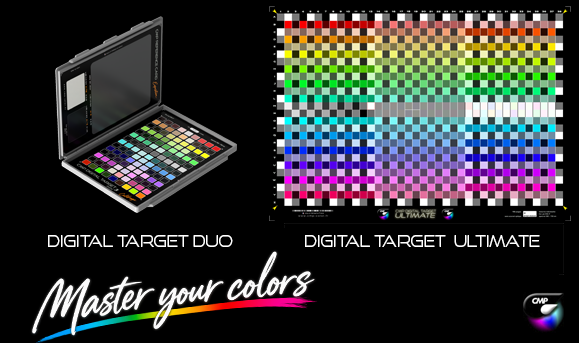
CMP Digital Target come with measurement files in Lab and Spectral mode. Digital Target Duo are measured per production batch, while Digital Target Ultimate is measured individually for greater accuracy. These reference files can be used by any compatible ICC/DCP profiling software to create your own profiles.
If you don't want to do your own calibrations, I offer a DCP calibration (compatible with Adobe Photoshop / Lightroom software) for the purchase of a target (1 DCP calibration / 1 camera). You will then have the possibility to order additional calibrations for an affordable price.
Digital Target – Technical Information |
||
|
|
|
|
|
|
|
|
|
SIZE |
2 panels 14 x 10 cm |
22 x 30 cm |
|
PATCHES |
126 |
988 |
|
SURFACE |
MATTE |
GLOSSY |
|
PROFILES |
DCP / DNG |
DCP / DNG - ICC |
|
MEASUREMENT |
Production batch measurement |
individual / numbered |
|
|
|
|
|
GAMUT |
STANDARD |
ULTRA WIDE |
|
FONCTIONS |
Digital Camera Calibration DCP / Adobe and DXO Photolab |
Digital Camera Calibration |
CMP DIGITAL TARGET DUO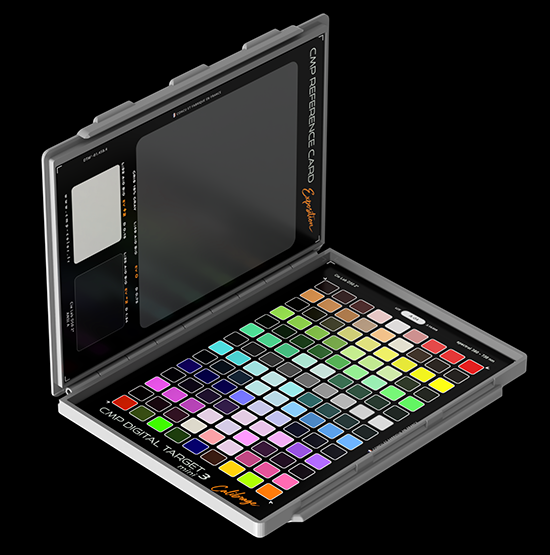
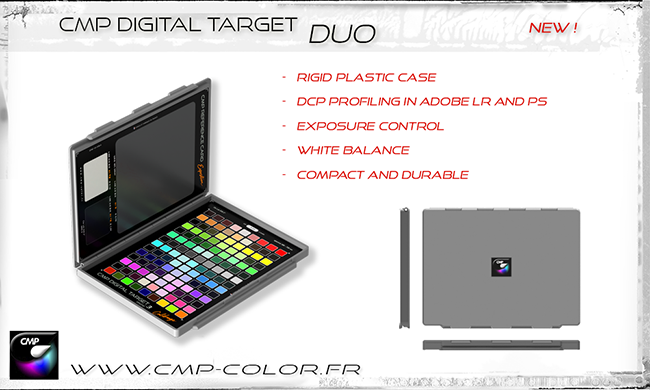
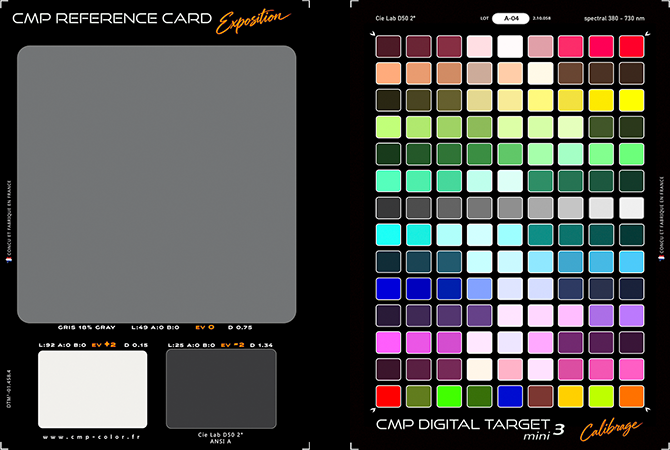
Made in France, the CMP Digital Target Duo combines exposure control, precise white balance adjustment, and professional DCP profiling in one compact, rugged case. Designed to travel with you, its robust plastic housing protects the target and fits easily into your camera bag, making reliable color control accessible wherever you shoot.
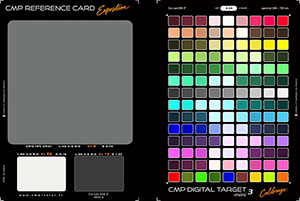
Two complementary panels deliver a complete workflow. The left-hand panel provides practical references for accurate exposure and fine-tuned white balance, helping you preserve the natural atmosphere of every lighting condition. The right-hand panel features 126 color patches for creating custom DCP profiles in Adobe Lightroom and Camera Raw, improving color accuracy and delivering more faithful, consistent results.
Reliable color data for every production batch. Spectral and Lab measurement files are supplied with the target, with each production batch measured individually. This provides documented colorimetric reference data for a more controlled and reproducible profiling workflow.
Built for real-world photography. Its matte, non-reflective surfaces minimize unwanted glare, making the target easier to use in a wide range of lighting conditions, both on location and in the studio.
From the first exposure to the final RAW adjustment, the CMP Digital Target Duo gives you the references you need to work with greater precision, consistency, and confidence.
An alternative to the popular 24 patches Color Checker target, the CMP Digital Target Duo offers a much larger sample number (126 patches versus 24) and a 25% larger gamut volume. In addition, the accuracy of the measurement files is such that the calibrations resulting from the Digital Target Duo are much more precise and subtle than with competing targets from other brands.

for DCP / Adobe profiles ( also DxO Photolab )
White Balance and exposure control
Many photographers use the automatic white balance setting on their cameras and do not necessarily consider fine-tuning it when processing their RAW files. This is a real shame, because automatic white balance neutralizes and standardizes the appearance of your images, regardless of the lighting conditions at the time of shooting. It is therefore important to be able to fine-tune the white balance when processing your images.
The principle is simple, take a first shot of the scene to be photographed with the Digital Target Duo in the field. Then take the shots quite normally. The first view which includes the target will be used to define the appropriate white balance settings according to the shooting conditions. The white and grey patches allow you to fine-tune the white balance using the eyedropper tool in your RAW processing software.
The grey patch has a reflectance of 18%, corresponding to the reference level at which camera light meters are normally calibrated. A spot-meter reading taken from this patch should provide a correct exposure.
The white and black patches are positioned at +2 EV and −2 EV, respectively, relative to the 18% grey patch.
The 126 color ranges allow for the creation of high-quality profiles for Adobe Lightroom and Camera Raw software. Adobe's internal workflow allows for limiting the number of color ranges while maintaining very good profile efficiency.
The color rendering of Adobe software used for developing raw files is largely improvable, and highlight details are generally lost. Using custom profiles with "CMP" rendering eliminates these defects characteristic of the digital world. With proper calibration and careful choice of settings when creating profiles, you can achieve ideal color rendering and more realistic highlights.
The user manual is available online via a QR code on the back of the target. You can also access it here.
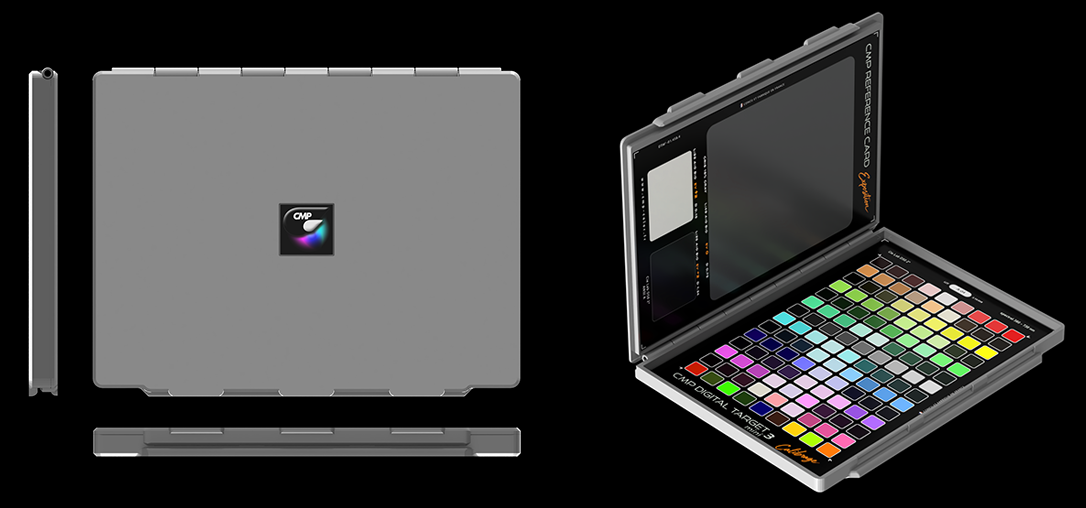
Rigid and robust case
15,5 x 12 x 1cm
CMP DIGITAL TARGET ULTIMATE 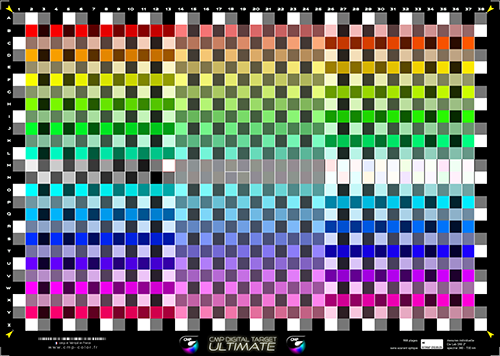

The new Digital Target Ultimate is the latest addition to CMP’s range of targets for calibrating your digital cameras. It is available on a new glossy substrate without optical brighteners, and measures 22 × 30 cm.
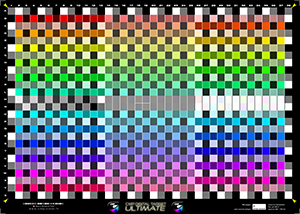
The new color sampling distribution is arranged at 15° intervals, across 3 saturation levels and over a very wide color gamut, with a high Dmax and saturated colors never before seen on camera calibration targets!
Around the perimeter of the target, a black/gray/white checkerboard pattern allows software to evaluate the uniformity of illumination across the target and take it into account when calculating profiles.
For maximum color accuracy, Ultimate targets are individually numbered and supplied with their own individual measurement file. Each target is measured individually during production. Measurements are made using an X-Rite i1Pro spectrophotometer combined with an iO table.
The Digital Target Ultimate consists of 988 color patches and allows the creation of ICC profiles for any compatible application (DxO, Capture One, etc.), as well as DCP profiles that can be used directly in Camera Raw and Lightroom.
Because of its glossy surface, photographing the Digital Target Ultimate is more demanding than photographing a target with a matte surface. However, this limitation is manageable and minor compared with the quality of the profiles obtained. Detailed technical instructions for photographing the target are provided. Why use a glossy surface for a calibration target? A glossy surface provides better color saturation and deeper blacks, resulting in much more accurate profiles, with finer color sampling and better characterization of the shadow areas.
Please note: following the purchase of a target, I provide one free calibration for one camera body for Adobe Photoshop and Lightroom (DCP/DNG profiles), which is also compatible with DxO PhotoLab. If you require ICC profiles, you will need to create them yourself using suitable software.
COMPATIBLE SOFTWARESIf you want to perform your own calibrations, several options are available:
-Lumariver Profile Designer Software: The Digital Target charts and their measurement files can be used seamlessly in the ICC and DCP profiling software Lumariver Profile Designer (Repro version). Simply select "Custom Target (Grid)" and select the measurement file for your CMP chart (Lab or Spectral). This comprehensive software will allow you to create your own ICC and DCP profiles with all the necessary parameters. Learning the software can be a bit tedious, but the results will be there.
|
CMP Digital Targets and their measurement files can be used in Lumariver Profile Designer. in order, you will have to chosse " custom target ( Grid ) " and select your Digital target's measurement file. |
-BasICColor Input 6 Software: Only the CMP Digital Target Ultimate is compatible with INPUT 6. This software will allow you to import your chart measurement files (LAB or Spectral) and create DCP or ICC profiles.
-ARGYLLCMS: you can dowload the .cht file to use the Ultimate target in ArgyllCMP software

The created ICC profiles can be used in applications that handle external ICC profiles, the most well-known being DxO PhotoLab and Capture One, as well as any other raw development software that allows ICC profiles to be inserted into the processing workflow.
DCP profiles created based on shots taken from CMP Digital Target charts are compatible with Adobe Camera Raw and Adobe Lightroom. Note that the most recent versions of DxO PhotoLab also allow you to successfully use DCP profiles created for Adobe software.

|
The recent adobe software update changes the location of the profile selection and adds opportunities. The choice of profiles is now done in the main tab, which makes more sense. On the profile line, the active profile is visible, by clicking on the name of the profile, a list of favorite profiles appears. To put CMP profiles in this list of favorite profiles, click on the logo composed of 4 squares (arrow 1) to access the profile browser: a new list with several categories is available, in the category " profiles" profiles CMP are visible, click on the star at the top right of each thumbnail (arrow 2). What are the different categories of the Profile Explorer? ADOBE RAW : Traditional profiles offered by Adobe |
Examples of CMP profile correction
The pictures below are taken by photographers with whom I worked for the calibration of their digital camera and are published on this page with their agreement. The calculated profiles were applied to the original raw files, depending on the software used for the development, the calibration is either ICC (Capture One and DxO PhotoLab) or DCP (Adobe Lightroom and CameraRaw software). Hover over the image to switch between CMP rendering and standard rendering of the software.
move your mouse over the picture to between CMP rendering and standard software rendering

Adobe DCP profiling
move your mouse over the picture to between CMP rendering and standard software rendering

DCP profiling - DxO Photo Lab
move your mouse over the picture to between CMP rendering and standard software rendering

Photo by Didier Protin - Adobe DCP profiling
move your mouse over the picture to between CMP rendering and standard software rendering

photo by Yves Tabouret - Adobe DCP profiling
move your mouse over the picture to between CMP rendering and standard software rendering

photo by Jacques Gravelin - Adobe DCP profiling
As we can see in these examples, the corrections made by the CMP profiles can be spectacular depending on the images and the software used for the development of the raw files. In any case, the highlight rendering is much softer than the default rendering of the software used ( an article provides information on the interpretation of the raw levels here ) and the colorimetric corrections significantly improve the rendering of the images. Some characteristic colors such as fluos, reds, greens, skies and flesh tints find their appearance naturally. the last example, the difference in flower hue between Adobe Standard rendering and CMP rendering is particularly striking, as even creating DCP / DNG profiles with a large number of sampled colors is a real benefit! Work on raw images corrected by quality profiles is greatly facilitated, the quality gain of the resulting images is very real.
IMATEST analyzes hover your mouse over the image to see the calibrated / uncalibrated rendering analysis

move your mouse over the graph
Imatest analyzes of DNG profiles completed
hover your mouse over the image
The graph above shows the difference between the theoretical rendering (square plots) and the actual rendering (round plots) when developing a raw file from a Pentax 645D in Camera Raw. Ideally the round and square be superimposed perfectly. The rendering offset is measured as a number: the Delta E (difference in color between two samples).
- rendering not calibrated: the rendering is raw at the output of software (uncorrected),
-
calibrated rendering: the rendering is corrected directly in Camera Raw
using a DNG profile created from a Digital Target shooting
We can easily see that the corrected rendering is much more respectful of the original colors, with a Delta E less than half in most cases (average and maximum dE) compared to the uncorrected rendering. Once corrected using a DNG profile the rendering is closer to the ideal rendering and the discrepancies between the theoretical and the measured values are very small.

The graph above makes it possible to understand what " level interpretation " is: when developing the raw file, an input raw value ( horizontal axis ) corresponds to an output level (vertical axis), these curves are therefore the reflection of the internal processing applied to the raw file. The white curve shows the default rendering proposed by Adobe: the highlights are exaggeratedly pushed upwards (upper part of the curve) in order to hide the overexposed parts present on your images, this type of rendering is very practical to avoid the effect " cottage cheese effect " ( from french expression ) on an overexposed cloud for example, the problem is that this rendering is applied to all images, even those that do not have overexposed areas! The result is a loss of detail and highlights in all your images.
CMP profiles are offered with 3 rendering curves: the highlights are much less pushed up than standard profiles, resulting in softer and more detailed highlights, it is a good solution to begin the process. treatment of a correctly exposed image, with a natural rendering while maintaining a progressive transition between highlights and pure white.
Digital Target Pricing
For the purchase of a CMP Digital target, you will receive your target as well as its numbered measurement files (LAB and SPECTRAL) and detailed shooting instructions. You will need these measurement files to carry out your own calibrations.
If you do not want to do your own profiles, 1 DCP ( Adobe Lightroom and Camera raw ) calibration for 1 camera is offered to you with the purchase of a target (operation to be carried out within 90 days after your purchase).
Additional camera calibration ( new profiles for another camera for example ) will be charged 44,50 euro.
You can order your CMP Digital Target with a Paypal payment:
|
WORLDWIDE SHIPPING |
|||
|
CMP DIGITAL TARGET Duo |
WORLDWIDE SHIPPING 15,50 € |
53,50 euro |
|
|
SHIPPING TO USA |
|||
|
CMP DIGITAL TARGET ULTIMATE |
WORLDWIDE SHIPPING 20,50 € |
69.50 euro |
|
|
SHIPPING TO USA |
|||
|
ADDITIONAL CAMERA CALIBRATION - you already have a CMP Digital Target |
44,50 euro | ||
Copyright (c) 2026 christophe metairie photographie - Tous droits reserves